Aomark Writer · Updated September 28, 2026
Use site selection, search, status filters, sorting, and the calendar to locate an article job.
Narrow the article list
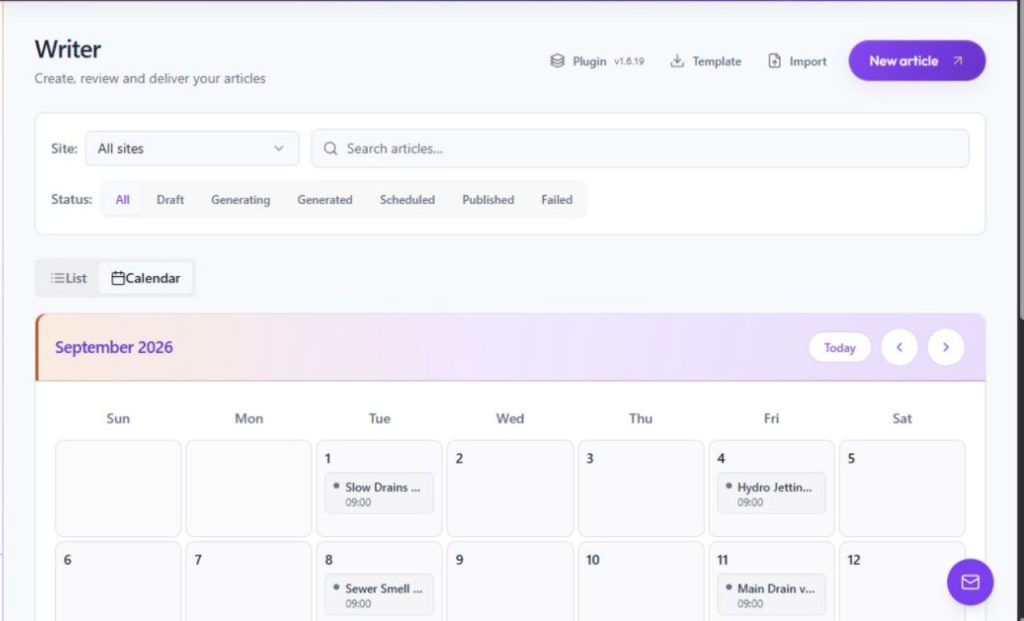
The Writer list includes a site selector, article search, and status filters for All, Draft, Generating, Generated, Scheduled, Published, and Failed. Use these controls together to focus on a site and a specific stage of work.
- Open Writer and choose the relevant site.
- Search for a title or topic, then select the status you want to inspect.
- Use the available sort options to order by Status, Title, Site, or Scheduled.
Use List and Calendar
List shows jobs in rows and supports selection and job actions. Calendar organizes scheduled jobs by date; selecting an item opens its Review view. Review status and destination before using resend, Pick date, or Delete job.
- Choose List for searching, sorting and selecting rows.
- Choose Calendar to locate scheduled work by date.
- Open Review from the job before making delivery or schedule changes.