Aomark Writer · Updated September 28, 2026
Review the SEO fields, use AI Polish as an optional draft aid, and save accurate search metadata to WordPress.
Review the SEO fields
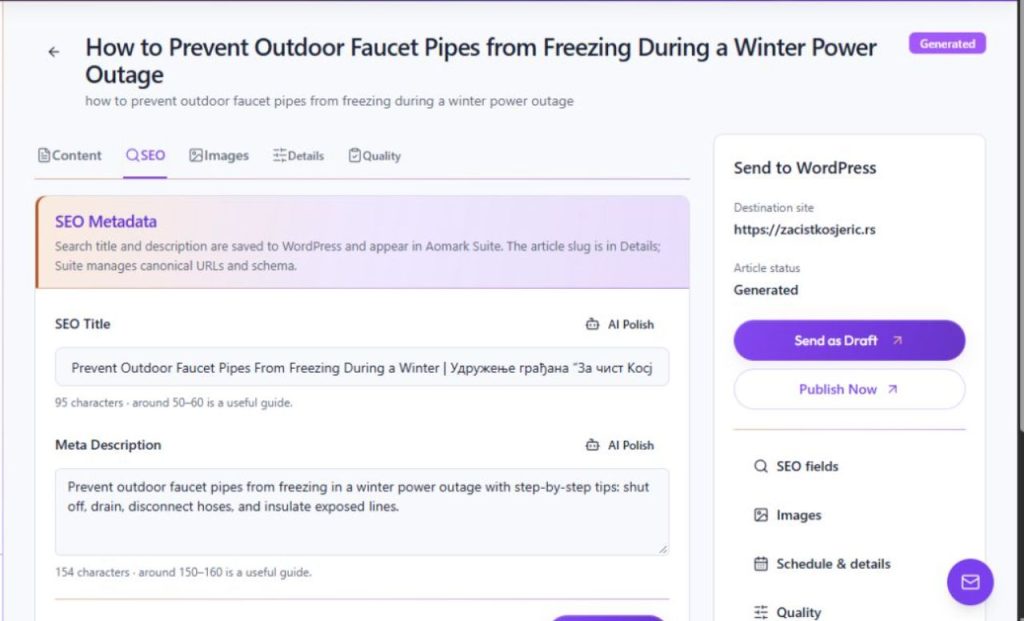
In the article's Review screen, open SEO. The tab contains SEO Title and Meta Description fields, length guides, and an AI Polish action for each field. Treat generated suggestions as drafts and check them against the article before saving.
- Open Review → SEO.
- Read the complete title and description and compare them with the article's actual content.
- Use AI Polish only if you want a suggested revision, then review the result.
Save the intended values
Edit the fields so they describe this article accurately and distinguish it from similar pages, then choose Save SEO. This saves the title and description to WordPress, where they also appear in Suite. The article slug appears in Details; Suite manages canonical URLs and schema. A search engine may display different title or description text.
- Remove claims, locations, prices or promises that the article does not support.
- Choose Save SEO and confirm the values in the review screen.
- Check which tool owns the live metadata if the public result differs.