Aomark Writer · Updated September 28, 2026
Add one topic or a batch of keywords, choose a connected site, and save draft jobs before starting generation.
Choose a site and add topics
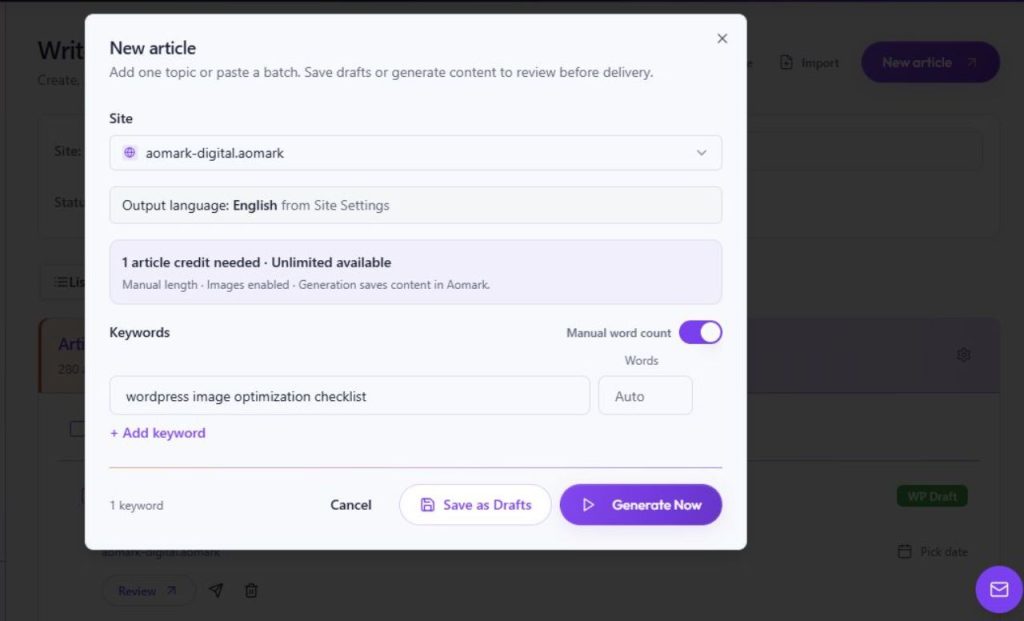
In Aomark Hub, open Writer and select New article. Choose the connected site that should receive the work. Enter one topic, or paste multiple primary keywords on separate lines for a batch. The output language is taken from that site's settings.
- Open Writer → New article.
- Choose the destination site and enter one topic or one primary keyword per line.
- Review the displayed estimate and article settings before saving.
Save a draft or generate now
Save as Drafts stores the jobs in Aomark for later work. Generate Now starts content generation; it does not publish the articles directly to WordPress. Review the current estimate and intended scope before starting a batch.
- Choose Save as Drafts when you want to prepare jobs without starting generation.
- Choose Generate Now only when the topics and destination are ready.
- Return to the Writer list to find the created jobs.