Aomark Writer · Updated September 28, 2026
Inspect the article in Review, edit the body, and save your corrections before sending it to WordPress.
Read the article in context
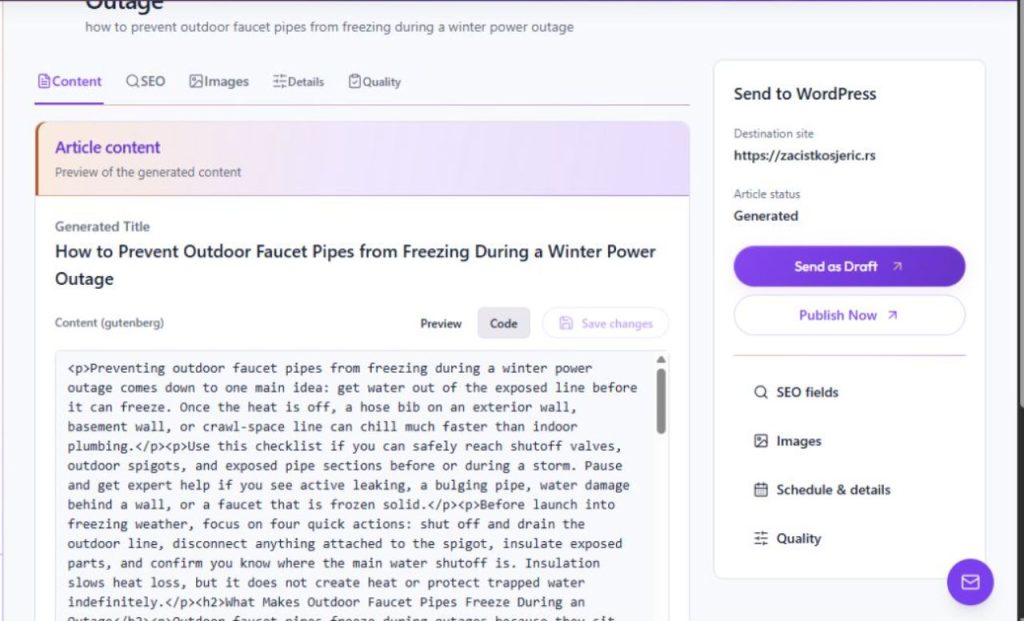
Open a generated job with Review, then select Content. Use Preview for a readable view or Code to inspect the underlying content. The editor includes common formatting controls such as headings, lists, quotations, and links.
- Open the generated job's Review screen.
- Select Content and read the full article in Preview or Code.
- Check names, figures, claims, links, headings and whether the article answers the intended topic.
Make and save editorial corrections
Edit the body in the content editor and use Save changes to retain the reviewed text in Aomark. The edit counter indicates that the content has been changed. Saving content in Writer is separate from delivering it to WordPress.
- Correct unsupported or inaccurate statements and restore missing qualifications.
- Improve wording and structure while preserving the intended meaning.
- Choose Save changes, then review the saved version before delivery.