Aomark Writer · Updated September 28, 2026
Check the article's site, keywords, taxonomy, slug, format, target length, schedule, and WordPress delivery details.
Read the article details
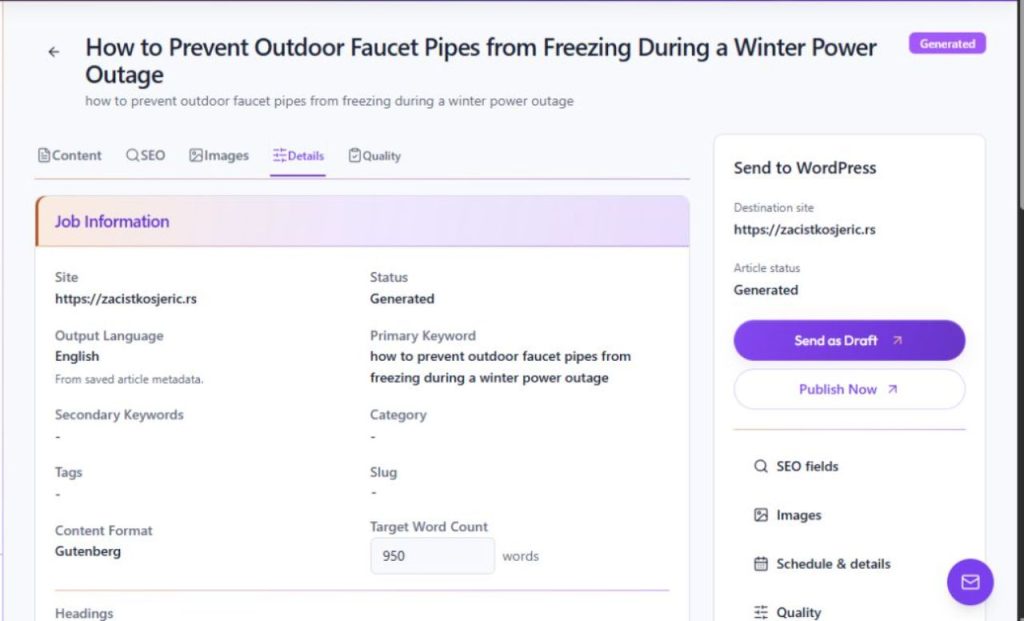
Open Review → Details to see the selected site, status, output language, primary and secondary keywords, category, tags, slug, content format, target word count, headings, and scheduling fields. Use these values to understand how the job is configured and spot mismatches with the article brief.
- Open the article's Details tab.
- Compare the site, keywords, category, tags and format with the brief.
- Check the displayed slug, target word count and headings before delivery.
Check schedule and WordPress status
Details also shows the schedule, WordPress status, post ID and permalink when available, along with telemetry. An empty schedule means the job is a draft. For a scheduled job, check the displayed date and time in the site's timezone; for a delivered post, use the permalink to open its WordPress destination.
- Check whether a schedule is set or empty.
- Review the displayed WordPress status, post ID and permalink when available.
- Open the permalink to confirm the destination post when the job has been delivered.