Aomark Writer · Updated September 28, 2026
Review the article and choose Resend as Draft to deliver it to the selected WordPress site without publishing it.
Complete the Writer review first
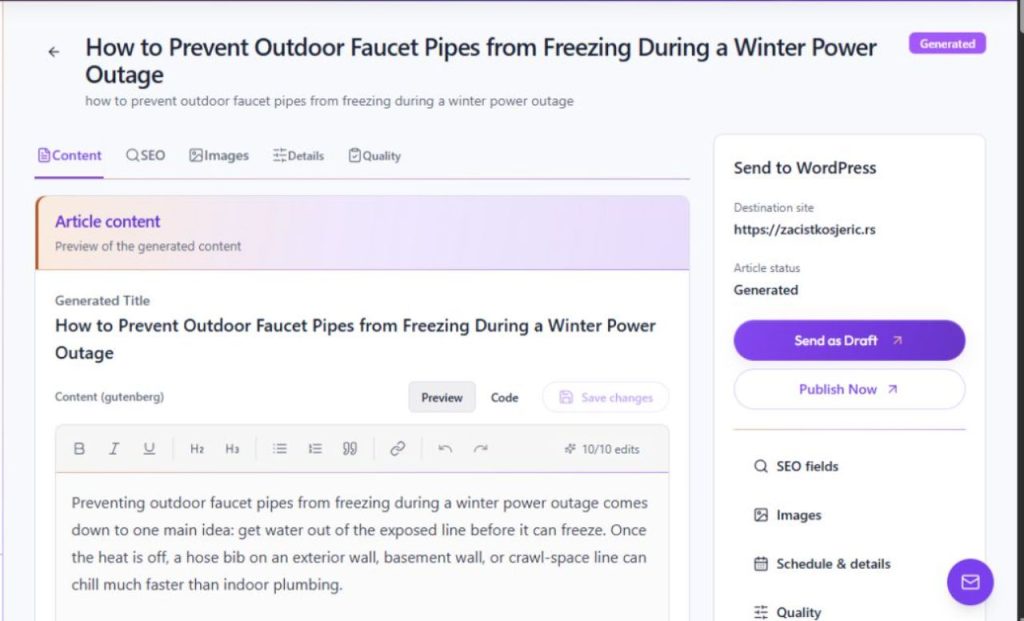
Open the generated job's Review screen and confirm the destination site, content, SEO fields, image choice, details, and schedule. Delivery actions change the selected WordPress destination, so check the article and site before proceeding.
- Review the body in Content and save any final changes.
- Check SEO and Details, then confirm the destination site.
- Resolve any failed or missing information before sending.
Resend as a draft
Choose Resend as Draft in the delivery panel. This is separate from Resend & Publish. After the action, check the reported status and use View in WordPress to review the delivered post.
- Choose Resend as Draft for the intended job.
- Read the Hub's response and confirm the displayed WordPress status.
- Use View in WordPress to inspect the destination draft.